Section 8. Register your staff & access our free recruitment service

  1. Programme onboarding & delivery process

Employer due diligence and preparing your business for apprenticeships

  1. Register an interest: See ‘register an interest’ section. We can then check initial eligibility for funding.
  2. Quality call: A call with the sales team to get a full understanding of how the incentives, funding and programmes work. Speak to your main point of contact who can send you a link to book a Teams call directly into their diary.
  3. DAS (Digital Apprenticeship Service) account: See ‘DAS’ section to how you set this up.
  4. RLRP (Right Learner Right Programme) task: Contains a short video, followed by some basic tick-box knowledge check questions and finally, a list of all the types of responsibilities the employee would need, to be able to capture the competency evidence required to pass. If everything is ticked ‘yes’, then we continue. If anything is ticked as ‘no’ or ‘n/a’ then the staff member is required to speak to their line manager and establish a temporary responsibility that can be offered to achieve that evidence required. The evidence listed is mandatory, so if anything remains a no with no comment regarding a specific responsibility, then we cannot proceed with that particular programme.
  5. Staff would like to ask questions first? Request a link to directly book a Teams call into the sales teams diary. Selecting ‘learner’, rather than ‘employer’.
  6. H&S (Health & Safety) Site Assessment & Policies: You will be emailed or send a link to a H&S form which is largely a tick-box exercise, but it will ask you for your employee liability insurance details. Plus, it will ask for some supporting policies (scan/picture of front/main page with a date or signature on is enough) depending on the size of your business. All employers must provide an Equality & Diversity policy and if you have 5 or more contracted employees, a Health & Safety Policy. If the employee is under 18, you will also need a safeguarding policy and evidence of a DBS application (email screenshot), unless you have a valid one completed within the last 3 years. If you need any policy templates, please contact your main POC to provide you with one.
  7. SLA (Service Level Agreement)
  8. Handover email to training team

Learner pre-enrolment and onboarding

  1. Learner(s) will be given some initial assessments to complete before the enrolment day, these tasks consist of…
  • Enrolment form & Commitment statement: They will need to complete the Enrolment form/Commitment statement. (Please check junk/ spam boxes)
  • Maths & English assessments via Skills Forward (identifies current knowledge),
  • Learning style questionnaire (identifies their style of learning)
  1. Employer section: Enrolment form and commitment statement: Once the learner completes their section of the enrolment form and commitment statement, it will automatically be emailed to the employer to complete their section.
  2. Official enrolment: Once tasks 1-3 have been completed, the training team will send an email to the learner with some enrolment dates to meet the tutor to complete a SkillScan*. Once the enrolment day has been confirmed, you will receive a confirmation email. The tutor will then confirm the times they will be meeting to complete the enrolment. The enrolment can take between 1 & 2 hours, but you can group staff to be seen together to speed up the overall process.
    • Skillscan: Like the RLRP task, except it is a verbal check, conducted by the tutor, to assess how competent you are against the apprenticeship syllabus.

As an Ofsted regulated provider, we must confirm that we are giving (enough) new knowledge to your learners to justify the level of funding we are able to drawdown. Meaning, if they are too competent, then we won’t be able to run that particular programme for your employee and would have to look at an alternative.

  1. DAS authorisation: Finally, once we upload the learners’ details to your DAS account. Once we do, you automatically receive a government email from the apprenticeship service to authorise the funding for your staff member. However, your main POC will also contact you to remind you.


Learner journey & EPA (End Point Assessment)


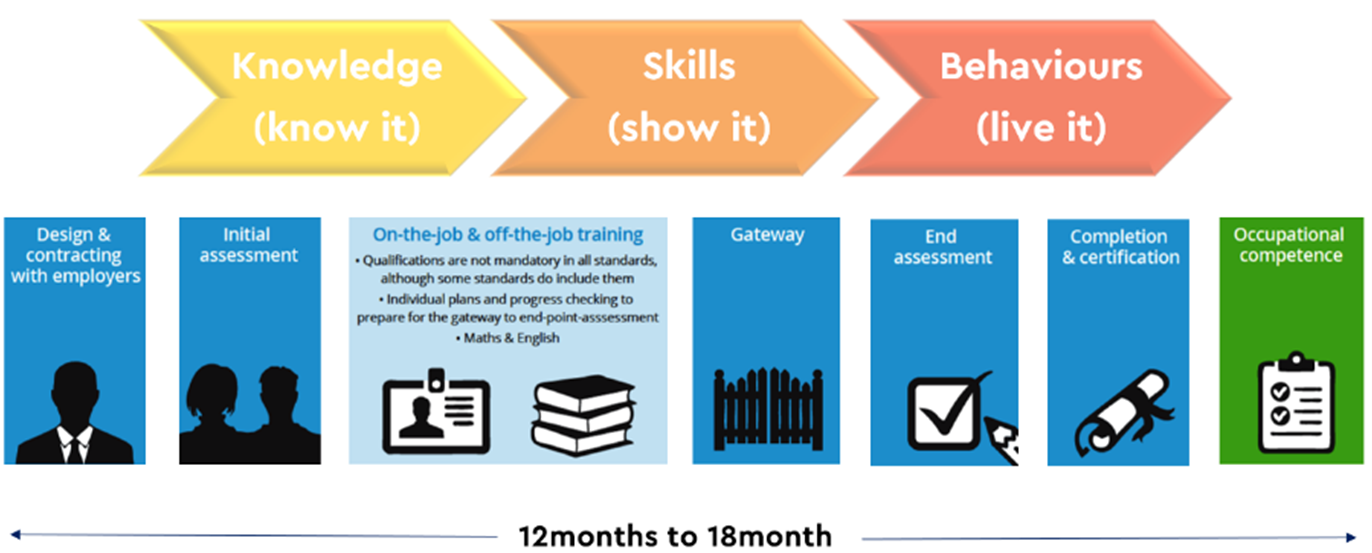
The learner will meet the tutor officially once per month remotely to review, support and guide them on their apprenticeship work and make sure they are on top of their OJTH diary. Every apprenticeship usually begins by completing mandatory safeguarding and prevent modules, via ETF (Education & Training Foundation) online and Math’s and English upskilling (only for those that need it). The programme will then focus on the creating a portfolio of evidence, consisting of Knowledge, Skills & Behaviours via knowledge worksheets and work-based evidence – to see the requirements for your specific programme, please click >here< > find your programme > Scroll to the bottom and select ‘VIEW ON IOA’ to view the KSBs and EPA.

EPA: Completion and submission of your portfolio of evidence forms part of the learners EPA (End Point Assessment). At around 50% to 70% of the way through the apprenticeship, learners will be introduced to any additional EPA requirements. Most programme usually consist of around 3 to 4 separate assessment tasks. These assessments can vary from a professional discussion based on the competency skills evidenced in your portfolio, submission of a project accompanied by a presentation, to a multiple-choice exam and observation. These take after your apprenticeship programme has completed and can take place anywhere between 2 weeks and 3 months after, depending on several different factors i.e., tutor availability, exam windows and access to certain EPA criteria. This is all funded and coordinated via your training provider. To view your programmes EPA, click >here< > find your programme > select > ‘Roadmap’ to view the EPA requirements.